![Ozen Long - Back (1)-2.png]](https://support.ozeninc.com/hs-fs/hubfs/Ozen%20Long%20-%20Back%20(1)-2.png?height=50&name=Ozen%20Long%20-%20Back%20(1)-2.png)
Answer
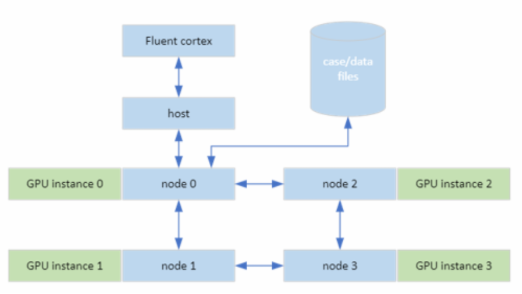
You can overcome this by enabling the GPU remap option in the Parallel settings tab when you're launching Fluent. This option is available only when the Native GPU Solver solution is selected.
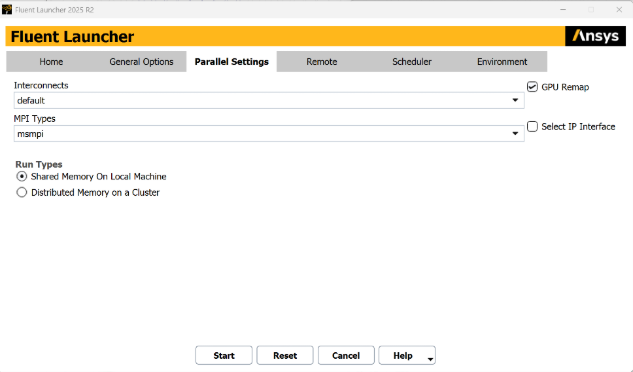
This option will remap the different cores to a single GPU or multiple GPU depending of the situation.
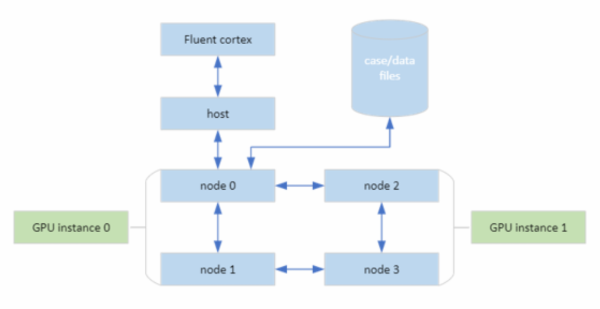
Ansys link: https://ansyshelp.ansys.com/public/account/secured?returnurl=//Views/Secured/corp/v252/en/flu_ug/flu_ug_sec_gpu_solver_starting.html