![Ozen Long - Back (1)-2.png]](https://support.ozeninc.com/hs-fs/hubfs/Ozen%20Long%20-%20Back%20(1)-2.png?height=50&name=Ozen%20Long%20-%20Back%20(1)-2.png)
Answer
- Important: Set a large number for the maximum iterations in the CFX-Pre.
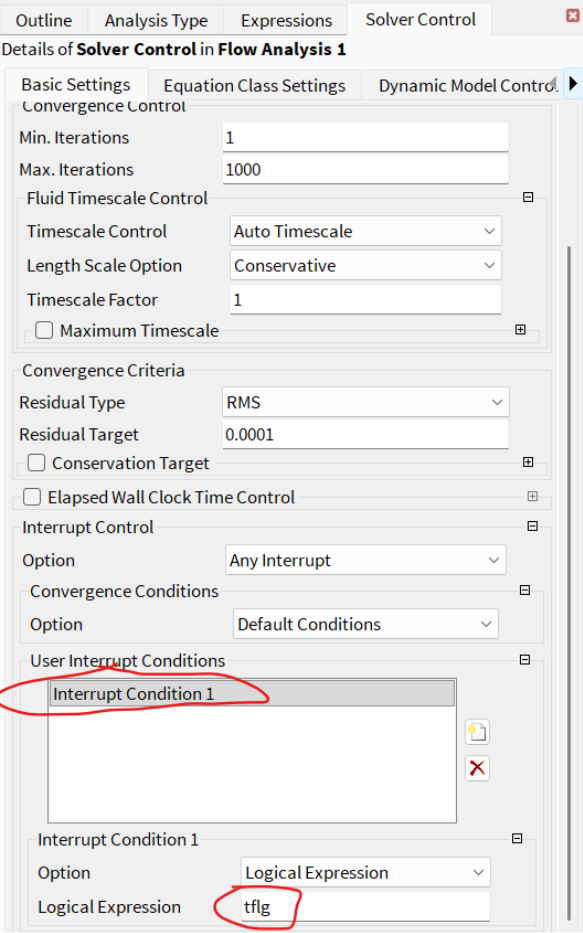
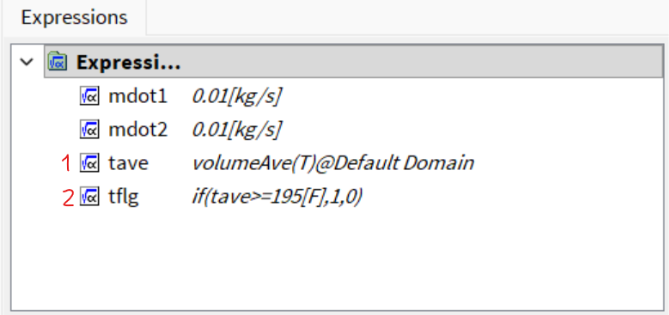
- Then set an interrupt control based on monitored parameters reaching a constant value. For example. You are monitoring the average temperature in a mixer, and you want to stop the simulation when it reaches 195F.
Create an expression (1) for that condition. Next, create another expression (2) for the ‘interrupt’ control:
Now, go to the Solver Control section.