![Ozen Long - Back (1)-2.png]](https://support.ozeninc.com/hs-fs/hubfs/Ozen%20Long%20-%20Back%20(1)-2.png?height=50&name=Ozen%20Long%20-%20Back%20(1)-2.png)
Archiving files in HFSS helps save and restore simulation projects efficiently, with the option to include the entire results directory. To archive a project, follow these steps:
- Click File > Archive or select the Desktop tab of the ribbon and click Save Archive.

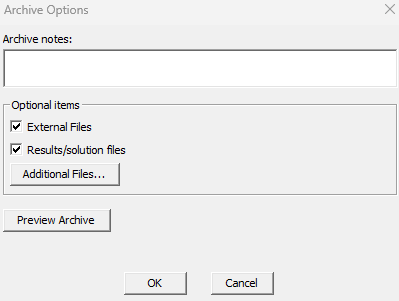
- In the Archive Options dialog box, check the box for Results/Solutions files to include the results, and then click OK.
- Select a directory and click Save to create a zipped AEDT file.