![Ozen Long - Back (1)-2.png]](https://support.ozeninc.com/hs-fs/hubfs/Ozen%20Long%20-%20Back%20(1)-2.png?height=50&name=Ozen%20Long%20-%20Back%20(1)-2.png)
To do this, open Notepad++ and write the correct commands to set the path and run the model in non-graphical mode, as shown below.
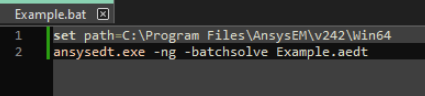
You will need to add more commands depending on your setup. For instance, if the model has a parametric sweep, a similar command to the one shown below will run it. You can find more information about this in the HFSS manual.

Once you have written the commands, save the file as a batch file (.bat), place it where your model is located, and then run the batch file. This will open a command prompt, and once the model is solved, the command prompt will close. You can then open your model to view the results or use a script to export them.