![Ozen Long - Back (1)-2.png]](https://support.ozeninc.com/hs-fs/hubfs/Ozen%20Long%20-%20Back%20(1)-2.png?height=50&name=Ozen%20Long%20-%20Back%20(1)-2.png)
It is possible to change the frequency unit when exporting your S-parameters matrix by following these steps:
-
Click on HFSS > Design Settings.
-
Select the Export On Completion tab and check the "Export touchstone file after completing frequency sweep" option.
-
Click on "Set/View Export Preferences...".
-
Check the "Change output file format" option and select the desired unit.
-
Click "Save As Default".
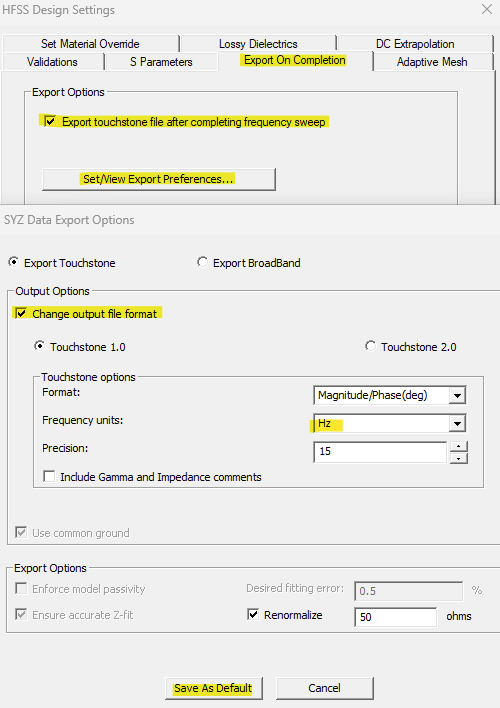
Once you click Analyze to solve your model, a folder containing your S-parameters with the specified unit will be automatically exported. Also, you can click Analyze to export it for a model that already has a solution. Note that manually exporting the file will use the default unit (GHz).