![Ozen Long - Back (1)-2.png]](https://support.ozeninc.com/hs-fs/hubfs/Ozen%20Long%20-%20Back%20(1)-2.png?height=50&name=Ozen%20Long%20-%20Back%20(1)-2.png)
If you receive net-name warnings in Simplorer, follow the steps below to automatically assign proper names:
- Select the entire circuit
- Press Ctrl + A on your keyboard to highlight all components and wires.
- This ensures every connection in your schematic is included for renaming.
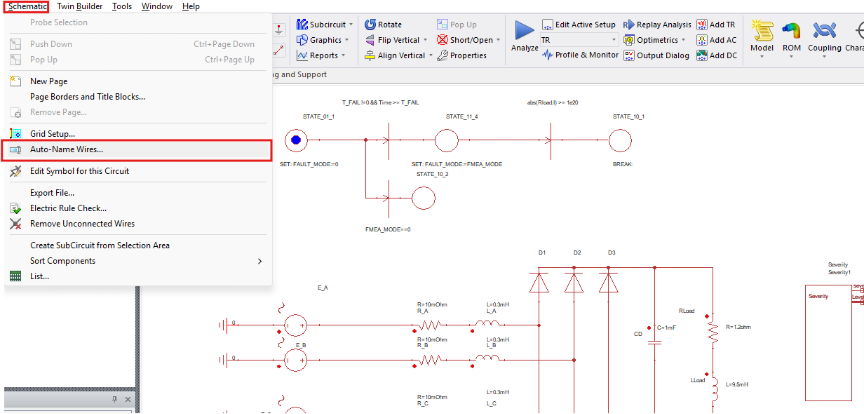
- From the top-left menu, choose Schematic → Auto-Name Wires…
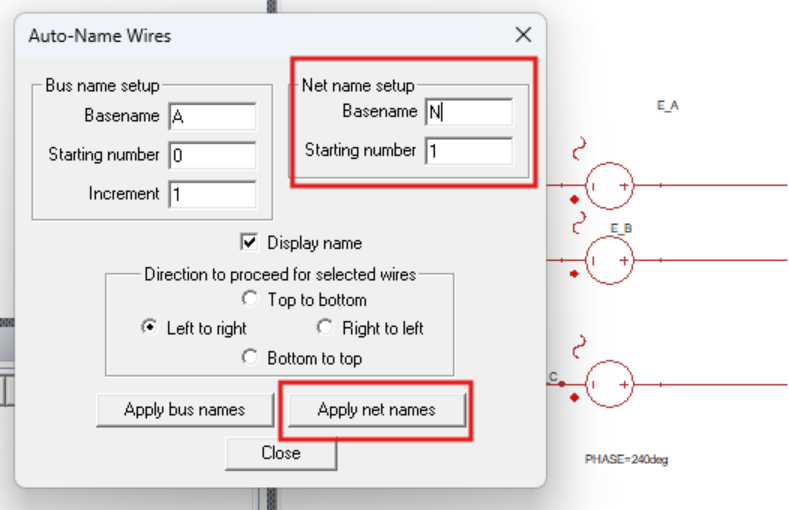
- The Auto-Name Wires dialog will appear.
- Choose a Base Name, for example N.
- Set a Starting Number, typically 1.
- These options will generate net names such as N1, N2, N3 …
- Click Apply Net Names to assign names to all selected wires.
5.Verify results
- Check that each wire now has a valid name beginning with a letter.
- The warnings should no longer appear.
Notes and Tips
- These warnings do not affect simulation results — they exist only to enforce proper naming conventions.
- If you prefer custom prefixes (for example, “PH” for phase nets or “V” for voltage lines), you can replace the base name accordingly.
- Saving the model after renaming helps keep the updated net list consistent across future exports or coupled simulations.