-2.png?height=120&name=Ozen%20Long%20-%20Back%20(1)-2.png)
- Help Center
- Ansys CFD
-
Getting Started With Ansys
-
Ansys Installation
-
Licensing
-
Ansys Mechanical
-
ANSYS AEDT
-
Ansys Maxwell
-
Ansys HFSS
-
Ansys CFD
-
CAD
-
Meshing
-
LS-Dyna & LS-Prepost
-
SpaceClaim
-
Ensight
-
Ansys Lumerical
-
Zemax
-
Discovery
-
AUTODYN
-
Workbench
-
Ansys EMC Plus
-
SIwave
-
CFD-Post
-
Ansys Sherlock
-
Q3D
-
Ansys 3D Layout
-
Fluent Meshing
-
Thermal Desktop
-
Icepak
-
Ansys Icepak
-
Twin Builder
-
Fluent
-
AEDT Circuit
-
EMA3D
-
Linux
-
Optislang
-
Motor-CAD
-
Ansys CFX
How to stop a CFX simulation when a condition based on a variable is met
When monitoring a variable during a simulation, it is possible to automatically stop the run once it reaches a defined value. This blog explains how to set that up.
Answer
- Important: Set a large number for the maximum iterations in the CFX-Pre.
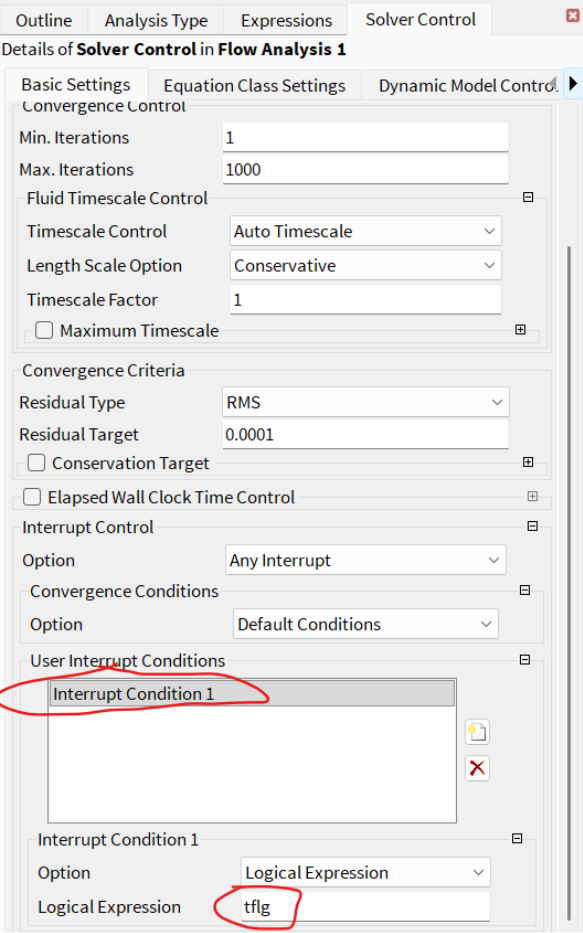
- Then set an interrupt control based on monitored parameters reaching a constant value. For example. You are monitoring the average temperature in a mixer, and you want to stop the simulation when it reaches 195F.
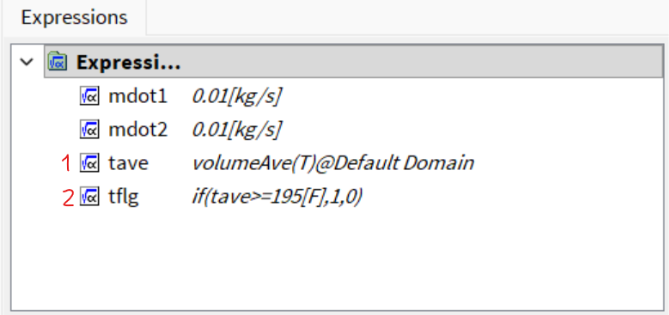
Create an expression (1) for that condition. Next, create another expression (2) for the ‘interrupt’ control:
Now, go to the Solver Control section.