-2.png?height=120&name=Ozen%20Long%20-%20Back%20(1)-2.png)
- Help Center
- Ansys CFX
-
Getting Started With Ansys
-
Ansys Installation
-
Licensing
-
Ansys Mechanical
-
ANSYS AEDT
-
Ansys Maxwell
-
Ansys HFSS
-
Ansys CFD
-
CAD
-
Meshing
-
LS-Dyna & LS-Prepost
-
SpaceClaim
-
Ensight
-
Ansys Lumerical
-
Zemax
-
Discovery
-
AUTODYN
-
Workbench
-
Ansys EMC Plus
-
SIwave
-
CFD-Post
-
Ansys Sherlock
-
Q3D
-
Ansys 3D Layout
-
Fluent Meshing
-
Thermal Desktop
-
Icepak
-
Ansys Icepak
-
Twin Builder
-
Fluent
-
AEDT Circuit
-
EMA3D
-
Linux
-
Optislang
-
Motor-CAD
-
Ansys CFX
How can I run a CFX model sequentially using two different solver setups?
The most straightforward way to run the same CFX model with different solver settings, such as varying boundary conditions or solver controls, in sequence is to use the multi-configuration feature or the Design Points functionality in Workbench. Belo
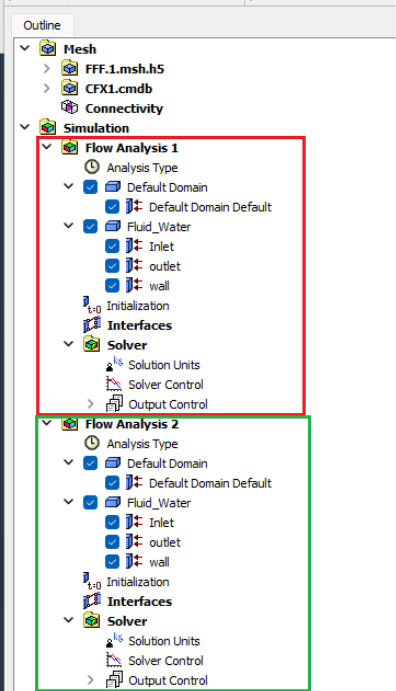
Configuration 1 with Flow Analysis 1
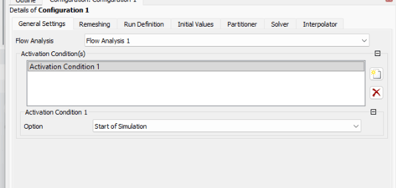
Configuration 2 with Flow Analysis 2
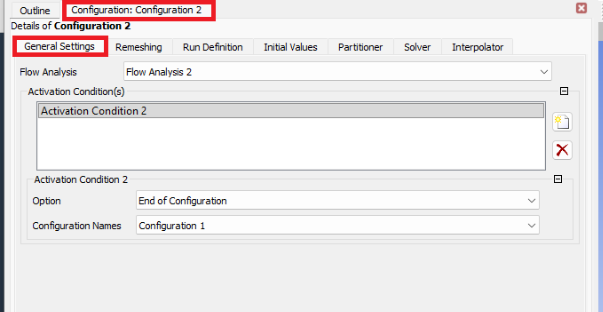
3- Configuration 2: Initial Value
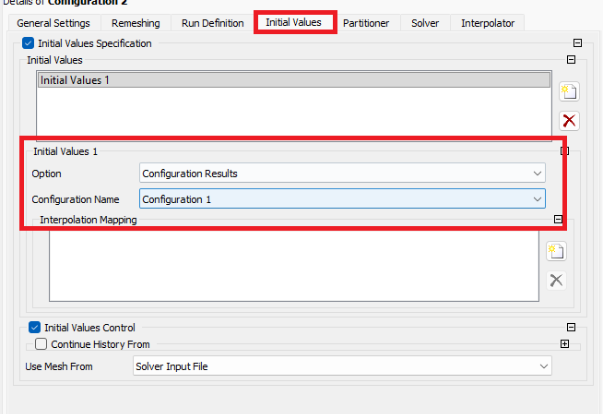
4- The solver will run the first configuration, and upon completion, automatically proceed to the next using the results of the first as an initial condition for the second.